
How many blocks does my Minecraft build need? Material lists and survival effort
Count every block of a build as stacks and shulker boxes, tick items off while you gather, and get a rough estimate of the hours it takes in survival – for your own builds, gallery builds and imported schematics, free in genMC.
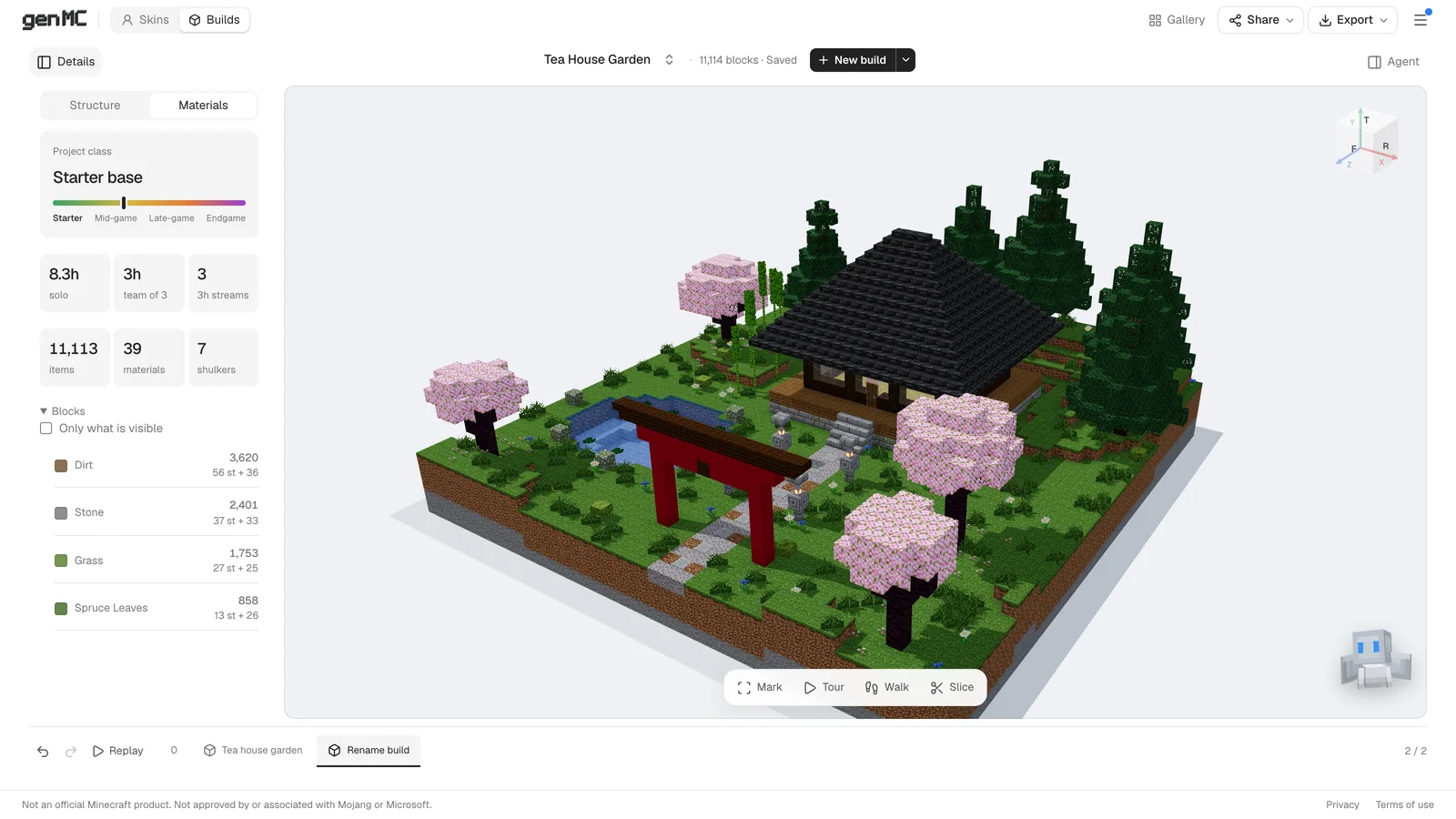
The worst moment in a survival build is the one halfway up the second floor, when the last stack of spruce planks runs out. A creative-mode build or a schematic hides how much material it really takes. genMC counts it for you: every block, in stacks and shulker boxes, with a checklist – and a rough estimate of how long the project takes in survival.
Where the numbers come from
The material list works for every build in the build studio:
- a build your agent made with you,
- a build from the gallery – Open in Build Studio makes your own copy,
- a schematic you already have:
.schem,.litematic,.nbtor an old.schematic, opened with the arrow next to New build (how that works).
Open the list
Choose Details above the 3D view and switch to the Materials tab. At the top you get an overview of the effort; below it, every item the build needs.
The counts are made for gathering:
- Stacks of 64 plus the remainder – 4,000 stone bricks are 62 stacks and 32.
- Shulker boxes of 27 stacks – those 4,000 stone bricks fill a little more than two.
- Counted like in the game: a double slab counts as two slabs, a door or a bed counts once, not once per half.
Only the part you are building now
Big projects are built in stages, and you don't need the roof tiles on day one. In the Structure tab next to Materials, isolate a part – the foundation, one tower, the garden – and tick Only what is visible above the block list. Now it shows exactly what this stage needs.
That works best with builds that are split into named parts. Builds made by an agent in genMC always are; for an imported schematic, ask your agent to sort it into parts first.
Tick it off while you gather
- The checklist keeps track of what you already have. It is saved per project in this browser, so it is still there when you come back after a mining session.
- CSV export opens the list in a spreadsheet.
- Copy puts it on the clipboard – for a note, a Discord message or your team's shared plan.
Is it doable in survival?
The overview at the top of the Materials tab answers the question behind the numbers. It rates the project as:
| Rating | Roughly means |
|---|---|
| Starter base | Under about 10 hours, only Overworld blocks and simple crafted or smelted ones, and not too big. |
| Mid-game | Under about 45 hours. Nether blocks are fine, luxury blocks only a handful. |
| Late-game | Under about 160 hours, End and ocean blocks included, a moderate amount of luxury blocks. |
| Endgame | Anything bigger, or full of luxury blocks. |
It also estimates the hours for gathering, placing and terraforming – solo and for a team of three – and how many 3-hour sessions that makes. It shows where the blocks come from (Overworld, processed, Nether, End and ocean, luxury), what progress you need and which farms are worth building first.
All assumptions are listed next to the estimate. It is a planning aid, not a promise: your speed, your tools and your luck with the next village will differ.
Let your agent make it cheaper
Agents in genMC read the same numbers as you. That turns the list into something you can negotiate:
The agent changes the build, checks the new list and the new estimate, and you see both update in the studio. How to connect an agent is in How to build in Minecraft with Claude.
Then build it
When the chests are full, export the build as .schem for WorldEdit or .litematic for Litematica – for your Minecraft version, from Java 26.3 back to 1.13 – and build along the hologram or paste it. The details are in Export, import and Minecraft, and everything about the Materials tab in Structure, materials and effort.
Try it with your own agent.
genMC is free and needs no account. Open the studio, connect the agent you already use and build together.