
Your agent isn't responding? How to fix a genMC request that keeps waiting
You typed a request, it says Queued, and nothing happens. Why that happens, what the statuses in the agent column mean, and how to get Claude, ChatGPT, Claude Code or Codex building again – usually in under a minute.
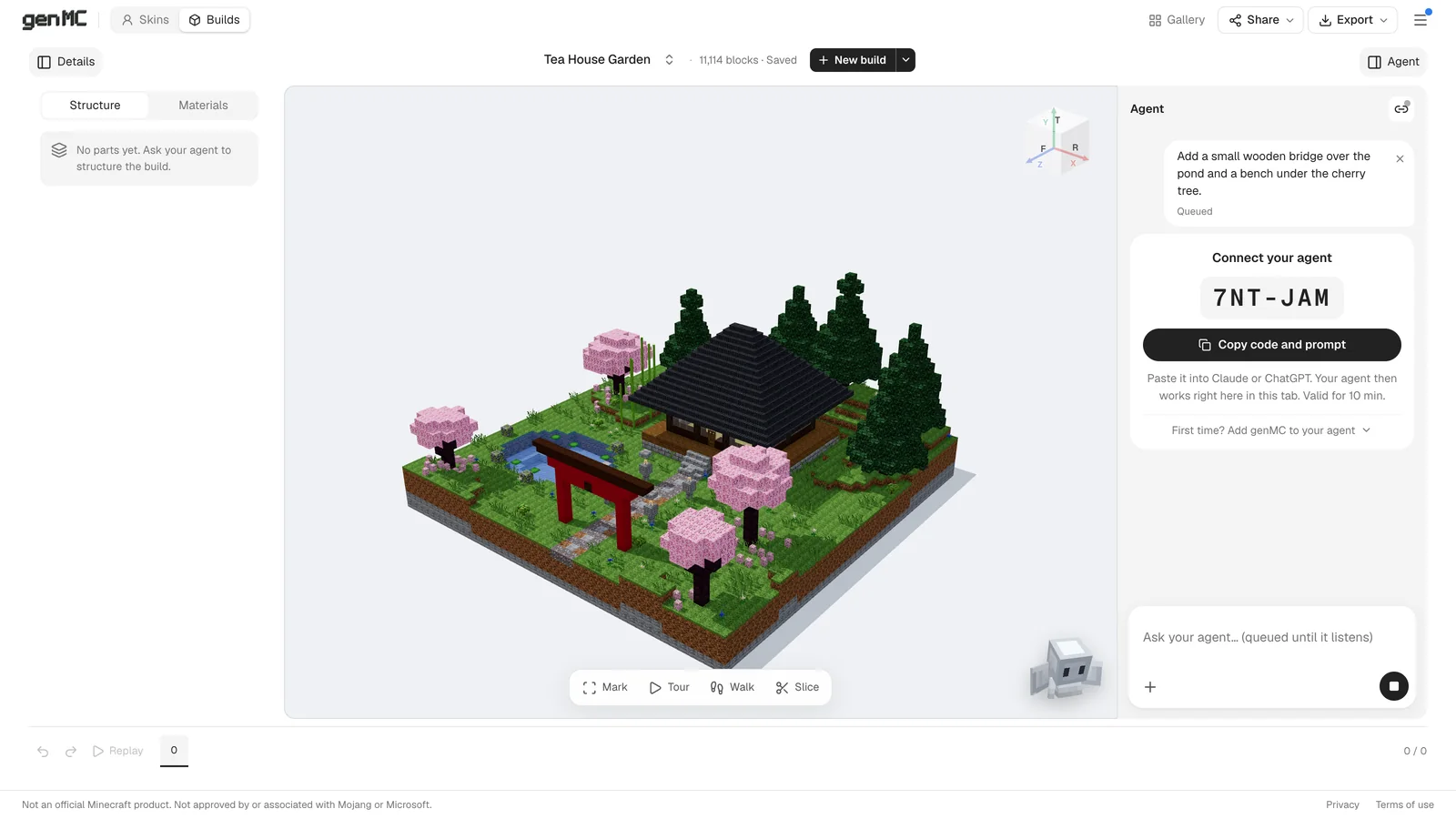
"It didn't work, it's still waiting." That comment under one of our tutorial videos describes the most common way genMC seems broken: you open the studio, type what you want, press Enter – and the request just sits there. Nothing is broken. In almost every case one of a handful of things is missing, and each one takes a minute to fix.
The one thing to know first
genMC has no AI of its own. The studio is the workshop; the builder is your agent – Claude, ChatGPT, Claude Code, Codex or another MCP client. A request you type into the studio waits until an agent is connected and listening. That is why the input line says "queued until it listens".
And a web page cannot wake an agent. Agents work in turns: they act while their app runs a reply and stop when the reply ends. If the agent stopped, your request waits until something in the agent's own chat gets it going again.
Read the agent column
The statuses tell you where it is stuck.
| You see | It means |
|---|---|
A pairing code like K7Q-4MX, status No agent | No agent is connected to this tab yet. |
| Your request marked Queued | It is waiting for an agent to pick it up. |
| Read | The agent has it and is working on it – not done yet. |
| Listening | The agent is connected and waiting for your next request. |
| Thinking, Working or Building | The agent is busy; the current step is shown next to it. |
| A notice like "No sign from your agent for 3 min" | The agent probably stopped. Wake it up (see below). |
Fix 1: no agent connected yet
This is the case behind most "still waiting" messages. The request was typed into the studio, but the code never reached an agent.
- In the agent column, choose Copy code and prompt.
- Paste it into your agent's chat and send it.
- The agent calls
genmc_pair, the column says "Claude is connected" (or your agent's name), and it picks up your queued request.
The code works once and for ten minutes. If it is older, choose New code.
In Claude on the web or desktop you can skip codes entirely since genMC 1.5: ask Claude for a build and the studio opens beside the chat, already connected. See genMC in Claude.
Fix 2: the agent has no genMC tools
If your agent answers with "I don't have a genmc_pair tool" or doesn't know what to do with the code, genMC isn't added to it yet, or the connection failed when the chat started.
- Claude (web, desktop): Settings → Connectors → add a custom connector with
https://genmc.app/api/mcp. - Claude Code:
claude mcp add --scope user --transport http genmc https://genmc.app/api/mcp. Without--scope user, genMC only exists in the folder where you ran it. - Codex CLI:
codex mcp add genmc --url https://genmc.app/api/mcp. - ChatGPT, Cursor and others: add an MCP server (Streamable HTTP) with the same URL.
Then start a new chat or session. A newly added server only loads there. All clients are listed in Connect an agent.
Fix 3: the agent stopped listening
The agent built something, you sent the next request, and now it stays Queued. The agent's turn ended – some apps end a reply after a while even when they were asked to keep listening.
- After three minutes without a sign, a notice appears above the input. Choose Copy wake-up prompt and paste it into the agent's chat.
- Or simply write "go on" in the agent's chat.
- Changed your mind? × takes unread requests back.
The agent then reads everything that queued up in the meantime.
Fix 4: the agent says it isn't connected
"Not connected to a genMC studio yet" or paired: false right after pairing (often ChatGPT). Some apps open a new connection for every tool call, so the pairing doesn't carry over. Tell the agent to pass its resumeKey with every genmc_call and genmc_status call. No new code is needed.
The agent says genMC disconnected or wants to use curl. Usually its tool list is just out of date. Tell it to call genmc_status; the answer brings the list up to date. If even that tool is missing, reconnect the genmc server in the agent app (in Claude Code: /mcp). The agent then returns to the same tab with its resumeKey.
The tools vanished after you looked at the gallery or opened another studio. They come back as soon as you return to the studio. For a studio the agent hasn't used yet, genmc_status again does the trick.
Fix 5: the tab, not the agent
- The tab was closed or the computer went to sleep. The agent's calls wait up to 30 seconds for the tab, then fail with a clear message. Reopen the studio; a reload keeps the pairing.
- The agent works in a different tab. Every tab has its own pairing, and a duplicated tab does not take over the agent. Pair again from the tab you want.
- The page asks you to reload. genMC was updated in the meantime. Reload once and carry on.
- Inside Claude, the studio doesn't appear. Choose Open genMC on the card: the studio opens in a new tab and stays connected to the chat.
Fix 6: the code is refused
| Message | Fix |
|---|---|
| "This code is unknown or expired" | Codes last ten minutes and work once. Choose New code. |
| "Too many wrong pairing codes" | Wait ten minutes. Wrong codes are limited per network so nobody can guess them. |
Still stuck?
The full list is in Troubleshooting. If nothing there helps, Menu → Feedback reaches the developer directly – describe what you see and which agent you use, and add an e-mail address if you want an answer.
Once it runs: How to build in Minecraft with Claude has tips for requests that get good results.
Try it with your own agent.
genMC is free and needs no account. Open the studio, connect the agent you already use and build together.