Make a Minecraft skin with ChatGPT or Claude – a real PNG you can wear
On its own, ChatGPT draws a picture of a character, not a skin Minecraft can load. Connected to genMC's free skin editor, ChatGPT or Claude paints the real 64 × 64 skin pixel by pixel, checks it in 3D and hands you the PNG.
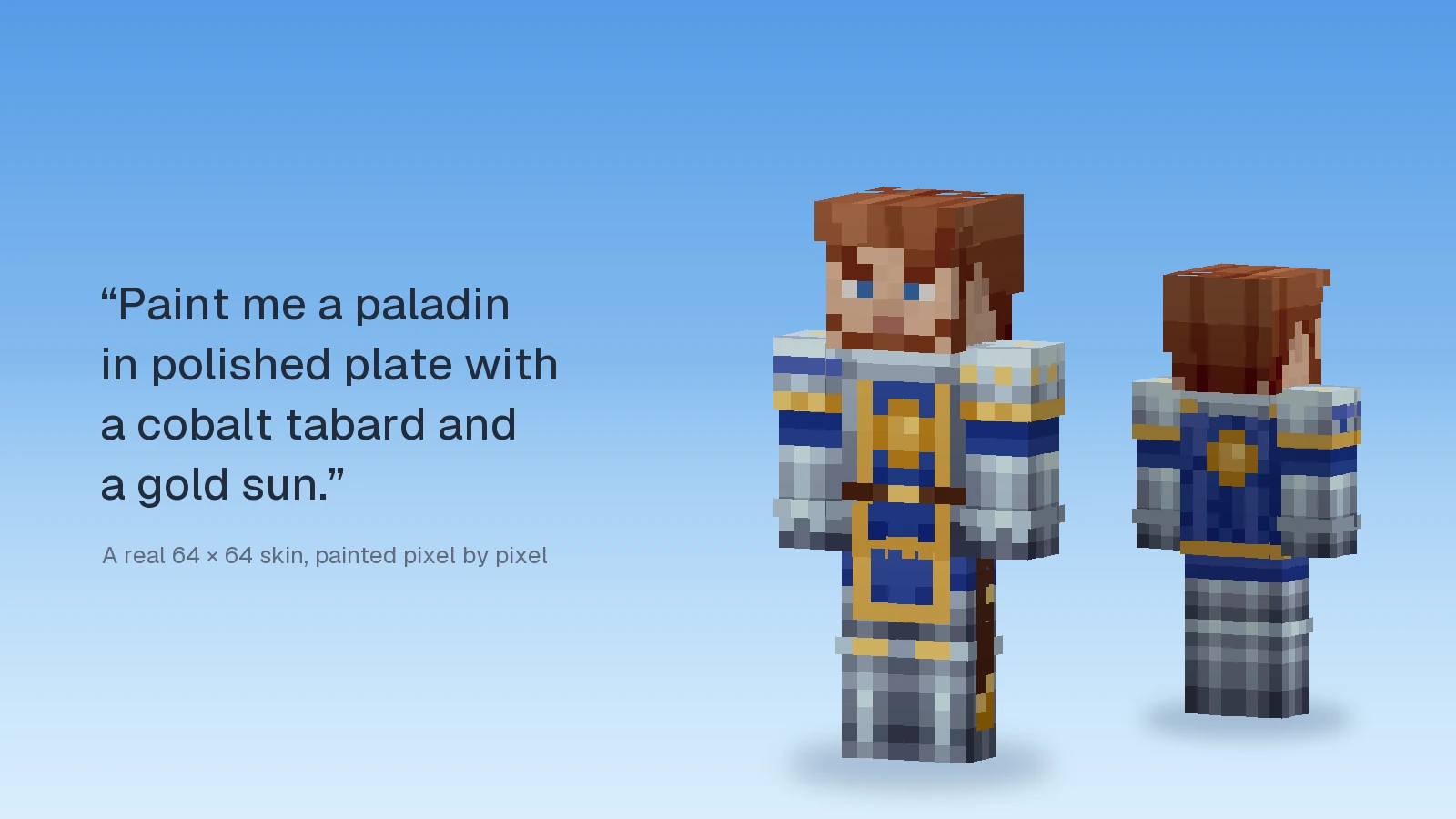
Ask ChatGPT for a Minecraft skin and you usually get a nice picture of a blocky character – but not a file Minecraft can load. A skin is a 64 × 64 PNG with a fixed layout: the face is an 8 × 8 square in the top left, arms, legs and body are unfolded around it, and a second layer holds hats, hoods and jackets. This guide shows how ChatGPT or Claude paint exactly that file in genMC's skin editor – for free, in your browser, while you watch.
Can ChatGPT make a Minecraft skin on its own?
Not reliably. There are two ways a chat AI can try, and both fall short:
- The image generator draws a character. Minecraft needs the unfolded texture instead, so the picture has to be squeezed onto the layout afterwards – and at 8 × 8 pixels for a face, that looks soft and smudged in game.
- Writing the PNG with code is possible, but the AI paints blind. It never sees the skin on the figure, so details easily land on the wrong side of a cube, seams between body parts don't match, and the outer layer stays empty or covers everything.
What is missing is a skin editor the AI can work in and look at. That is what genMC is.
What changes with genMC
ChatGPT or Claude connects to genMC's skin editor over MCP, the open standard for giving AI apps tools. In the editor it:
- paints single pixels on the base and the outer layer, in the Classic or the Slim model,
- renders the skin from the front, the back and the sides and corrects what is off,
- works in your browser tab while you watch – you can paint along or point at a spot at any time.
At the end you download a real 64 × 64 PNG for Java or Bedrock. genMC is free, runs no AI of its own and needs no account: the thinking happens within your ChatGPT or Claude plan.
With Claude: the editor opens beside the chat
- In Claude on the web or in the desktop app, open Settings → Connectors and add a custom connector named
genMCwith the URLhttps://genmc.app/api/mcp. - Start a new chat and ask:
Claude opens the skin studio right next to the conversation, already connected – no code to copy. Where Claude can't show it inside the chat, it offers a link instead that opens the studio in a new tab, connected just the same. You keep talking to Claude in its chat. More in genMC in Claude.
With ChatGPT: pair with a short code
- In ChatGPT's settings, add genMC once as a connector (a custom MCP server) with the URL
https://genmc.app/api/mcp. Custom connectors are not part of every ChatGPT plan; if you don't see the option, look for developer mode in the advanced settings. Menu names change from time to time – look for "apps", "connectors" or "MCP". - Open the skin studio in a desktop browser.
- In the agent column on the right, choose Copy code and prompt, paste it into ChatGPT and send it. The column shows when ChatGPT is connected; from then on it paints in exactly that tab.
- Tell ChatGPT what you want, right in its chat.
The same pairing works for Claude Code, Codex, Cursor and other MCP clients: Connect an agent has the exact step for each.
Prompts that work
A skin is tiny, so clear choices beat long stories:
- Name the model. Classic has 4-pixel arms, Slim 3-pixel arms.
- Two or three main colours and one detail – "dark green coat, brass buttons, a red scarf".
- Say what goes on the outer layer. A hood or a jacket "on the outer layer" stays removable in game.
- Ask for options. "Show me three versions of this armour" gives you three skins side by side.
Three requests to start from:
For the last one, load your current skin first: From player name next to New skin loads any Java player's skin as your own private copy.
Fix details yourself
Choose Mark, brush over the part you mean – the eyes, a belt buckle, one sleeve – and say what should change: "make this gold". Your marks travel with the request, so the AI changes exactly those pixels. You can also paint yourself at any time: pencil, eraser and face fill work on the 3D figure and on the flat texture, and every change can be undone. The full workflow is in How to make a Minecraft skin with AI.
Put it into Minecraft
Choose Export → Skin for Minecraft and you get the 64 × 64 PNG. In Java Edition, add it in the Minecraft Launcher under Skins → New skin and pick the same model (Classic or Slim). On Bedrock for Windows, Android and iOS, import it in the Dressing Room. Xbox, PlayStation and Switch cannot import PNG files. Step by step: How to change your Minecraft skin.
Questions
Is it free? Yes. genMC is free and needs no account to paint, save or download. ChatGPT or Claude work within your own plan.
Do I need a paid ChatGPT or Claude plan? genMC itself is free. Whether you can add a custom connector (an MCP server) depends on your ChatGPT or Claude plan.
Why not use a one-click skin generator? They are quicker for a first draft. Most of them turn a generated picture into a skin, though, often with credits or a sign-up, and you edit the result somewhere else. With genMC the AI paints in the editor and you keep refining in the same place. An overview: AI Minecraft skin generators compared.
Can I start from a finished skin? Yes. The skin gallery has over 220 free skins, including our own 220-skin drop. Open one in the studio and ask for changes: "give her a winter coat".
Try it: open the skin studio, connect ChatGPT or Claude, and describe the character you have always wanted to play.
Try it with your own agent.
genMC is free and needs no account. Open the studio, connect the agent you already use and build together.