
A Minecraft redstone simulator in your browser – with note blocks
Flip levers, press buttons and watch pistons, lamps and note blocks react in a 3D view that follows Java Edition's rules tick by tick – free in genMC, no game needed. What works, every note block instrument, and how your AI agent tests its own circuits.
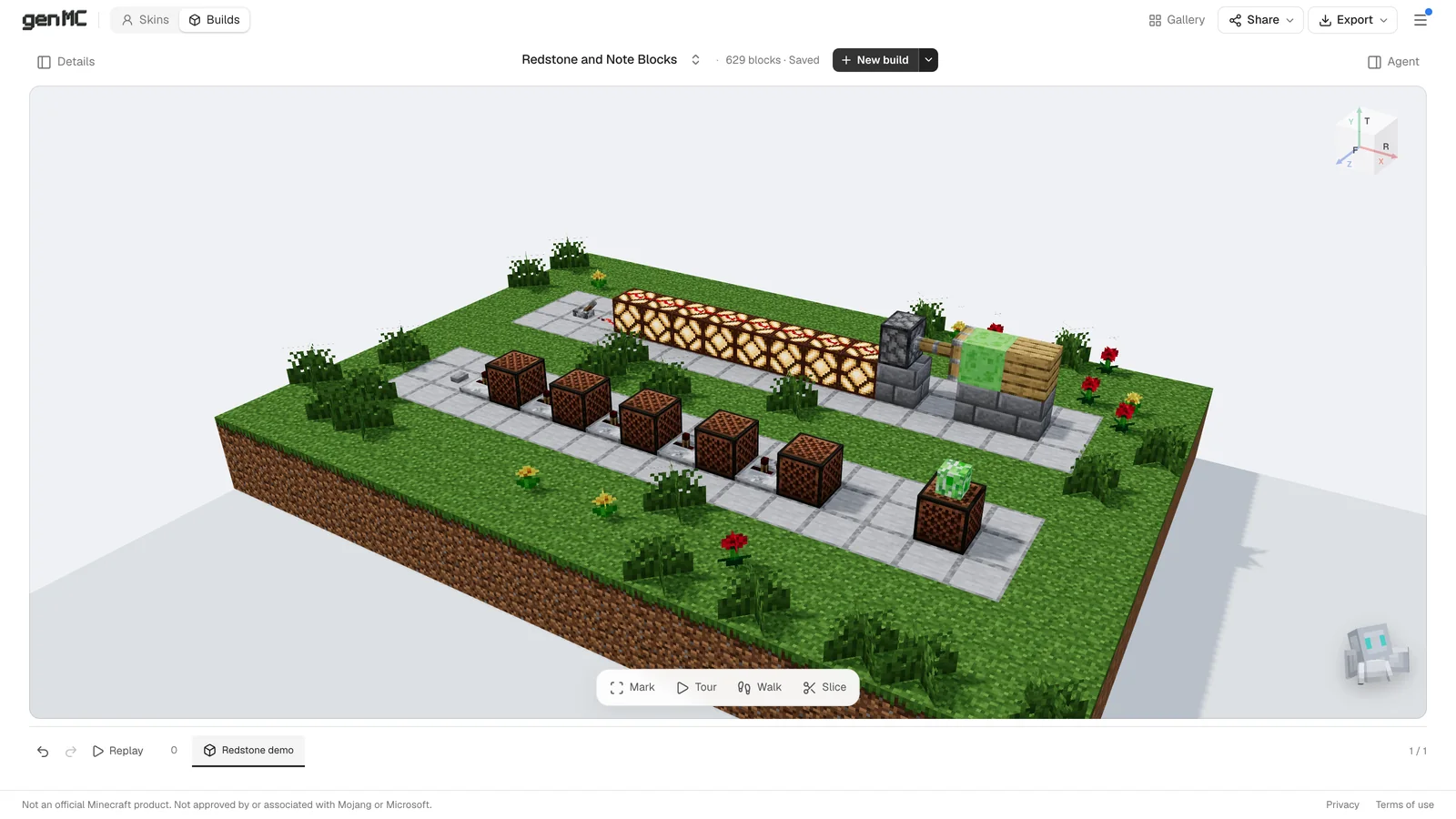
Testing a redstone contraption usually means starting Minecraft, opening a creative world and building it there. In genMC, redstone simply runs in the 3D view of every build. Click a lever and the dust lights up, lamps switch on, pistons push and doors open – in real game ticks, following the rules of Java Edition. Nothing to switch on, nothing to install.
Try it
Open any build with redstone in the build studio:
- one your agent built for you,
- a contraption of your own as a schematic (
.schem,.litematic,.nbt), opened with the arrow next to New build (how that works), - or a build from the gallery.
Then click a block in the 3D view to use it, the way you right-click in Minecraft. The pointer turns into a hand over everything you can use, and a tooltip says what a click does. A drag still turns the camera.
| Block | A click … |
|---|---|
| Lever | flips it |
| Button | presses it (stone 1 s, wood 1.5 s) |
| Pressure plate, tripwire, target | steps on it, trips it, hits it |
| Repeater, comparator | changes the delay or the mode |
| Daylight detector | inverts it |
| Wooden door, trapdoor, fence gate | opens or closes it (iron ones need redstone) |
| Dropper, dispenser, hopper, chest | adds an item (Alt-click takes one out) |
| Note block | tunes it a semitone higher and plays it |
What it simulates
- Redstone dust with signal strength from 15 down to 1, drawn brighter the stronger the signal, climbing over blocks, with strong and weak power.
- Torches invert (and burn out on clocks that are too fast), repeaters delay by 1–4 ticks and lock, comparators compare and subtract and read containers, cake, cauldrons and composters.
- Pistons and sticky pistons push up to 12 blocks in 2 game ticks, with quasi-connectivity. Slime and honey blocks drag along everything that touches them – but not each other.
- Observers pulse on every change, lamps turn off after 2 ticks, copper bulbs toggle on each pulse.
- Sources of every kind: buttons, levers, pressure plates, tripwire hooks, targets, daylight detectors that follow the studio light, trapped chests, lecterns, redstone blocks and sculk sensors that hear levers, doors, pistons, note blocks and footsteps.
- Droppers, dispensers and hoppers move items, powered and activator rails pass power along 8 rails, TNT lights from redstone and explodes after 4 seconds.
In walk mode your body counts too: standing on a pressure plate presses it, walking through tripwire trips it, and your steps reach sculk sensors.
Note blocks
Note blocks play like in Java Edition, with sound:
- Pitch: 25 notes over two octaves, from F♯ to F♯. Each click goes a semitone higher and wraps around at the top. Alt-click tunes lower, Shift-click only plays. Pointing at a note block shows its instrument and note, such as Harp G♯3.
- Air above: a note block only plays with air on top. A mob head on top plays that mob instead – zombie, skeleton, creeper, ender dragon, wither skeleton or piglin.
- Redstone plays it once each time it gets powered, so a line of repeaters becomes a melody.
The block underneath picks the instrument:
| Block underneath | Instrument |
|---|---|
| Wood | Bass |
| Sand, gravel | Snare drum |
| Glass | Hi-hat |
| Stone, bricks, ores, concrete | Bass drum |
| Gold | Bell |
| Clay | Flute |
| Packed ice | Chime |
| Wool | Guitar |
| Bone block | Xylophone |
| Iron | Iron xylophone |
| Soul sand | Cow bell |
| Pumpkin | Didgeridoo |
| Emerald | Bit |
| Hay bale | Banjo |
| Glowstone | Pling |
| Copper | Trumpet (older copper sounds more muted) |
| Anything else | Harp |
Tuning is the one thing that changes the build, as it does in the game: a burst of clicks becomes one step in the timeline, and you can undo it like any edit. Exports write each note block's pitch and instrument, so a pasted schematic sounds the same in Minecraft.
It never breaks your build
Everything except tuning is only for this visit. Flipping levers never changes the build, its history or its revision. When pistons or TNT break blocks, a bar at the top offers Restore and you are back to the build as placed. Change the build, and the simulation starts again on the new blocks.
What it doesn't do
genMC simulates blocks, not entities: minecarts, item drops and projectiles are not part of it. Pistons don't push blocks out of the build's plot. Containers hold simple items, one per slot, so a comparator reads 1 item in a dropper as signal 2 and 9 items as 15. For a mob farm or a minecart system, test in the game.
Let your agent test its own circuits
This is where a simulator in the studio pays off. Your agent controls the same simulation through a tool: it can pause the game, step through it tick by tick, use a lever or button like a player, read which lamps are lit and which pistons are extended, and reset everything to the placed state. So it can build a circuit, test it and fix it before it tells you it's done:
How to connect an agent is in How to build in Minecraft with Claude – or, in Claude on the web and desktop, simply in the chat: genMC in Claude.
Then take it into Minecraft
When it works, export it as .schem for WorldEdit or .litematic for Litematica, for your version from Java 26.3 back to 1.13. All the rules, down to the tick, are in Redstone.
Try it with your own agent.
genMC is free and needs no account. Open the studio, connect the agent you already use and build together.